How to Turn Any Photo into a Crochet Pattern — Step by Step
Turning a photograph into a crochet pattern used to require expensive software and an evening of fiddling. Here's the modern way, in three minutes, in a browser.
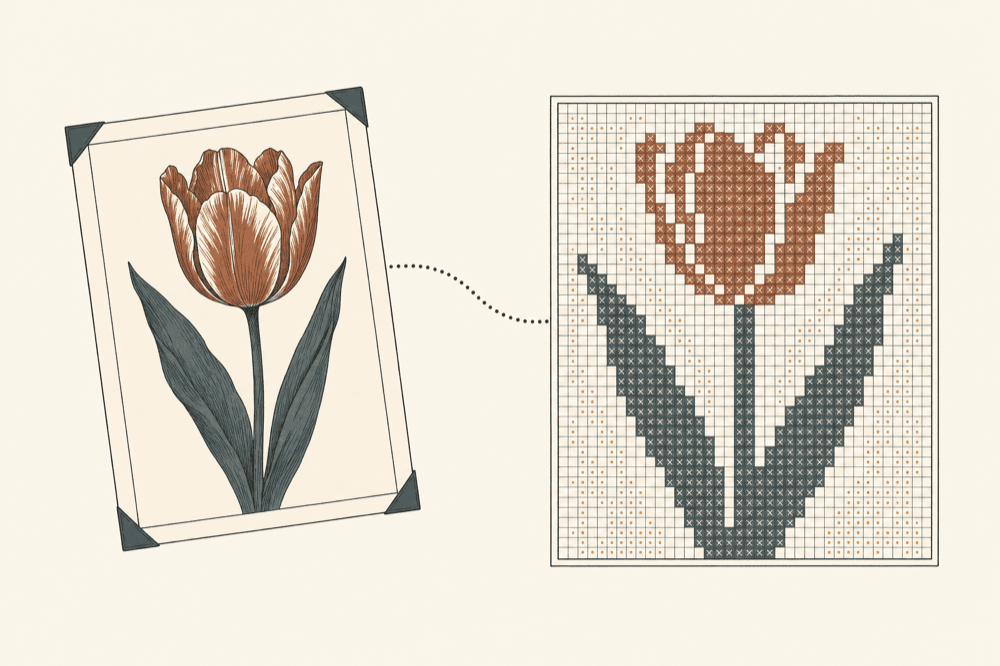
For thirty years, turning a photo into a crochet pattern required expensive software and an evening of fiddling. That problem is now solved in three minutes, in a browser. Here's the workflow, plus the tradeoffs that aren't obvious until you've made a few.
Pick the right photo
Not every photo converts well. The ones that do share these properties:
- Clear subject, simple background. The converter can't separate foreground from background — it sees the entire frame as one image. A shot with a busy background will become a busy chart.
- Strong tonal contrast. A photograph where the subject is much brighter or darker than the surroundings produces a clear chart. A foggy, low-contrast photograph produces a muddy chart.
- Limited color count. A monochrome or two-tone subject (a single object on a clean surface) reads beautifully. A six-color floral arrangement on a busy patterned tablecloth does not.
- Square or near-square framing. The converter outputs a square chart. Crop to a square first.
The kinds of photos that convert best: a single object on a plain ground, an architectural shape, a piece of botanical illustration, a typographic letter, a portrait silhouette.
The kinds that convert worst: candid family photos, snapshots, anything with text overlays, anything with extreme detail.
Step 1 — drop the photo
Open the free converter. Drag your photo into the upload area. JPG, PNG, WEBP, or HEIC. Up to 10MB.
Step 2 — pick the stitch type
- Filet crochet if you want a binary, high-contrast chart. Best for silhouettes and graphic shapes.
- Tapestry crochet if you want a multi-color chart with color blocks. Best for representational photos.
- Cross-stitch if you want fine detail and you'll be working on Aida cloth.
- Knit colorwork if you'll be knitting (stranded fair-isle).
For a first attempt, start with tapestry crochet at 80×80 and 8 colors.
Step 3 — pick the grid size and color count
Grid size controls how detailed the chart is. 50×50 is a good size for a small project (an applique panel or a sampler). 80×80 is the sweet spot for most photographs and most blanket-sized projects. 100×100 captures more detail but takes longer to stitch. 150×150 is for ambitious throws.
Color count controls how many distinct yarns you'll work with. 4 is minimal — almost graphic poster style. 8 is rich enough for most photos. 12+ is for detailed portraits and high-color images, but the chart gets harder to follow.
Step 4 — pick a yarn brand
The converter snaps each color in your photo to the closest match in your selected yarn brand's palette. Lion Brand, Bernat, Caron, and Knit Picks are stocked in the yarn database; the "Any" option uses the closest match across all brands.
The yarn-snap is done in LAB color space (perceptually uniform), not RGB, so the matched colors look correct rather than mathematically nearest.
Step 5 — generate
Click Generate pattern. The converter runs the pipeline in your browser:
- Resize the image to grid_size × grid_size with smoothed downsampling.
- Quantize to N colors using median-cut.
- Snap each color to the closest yarn.
- Build the chart.
- Calculate yardage per color.
- Output a PDF, a Pinterest-ready pin, and a copyable SLPN code.
The whole thing takes 1–3 seconds.
Step 6 — refine
If the result doesn't quite work, change one variable at a time:
- Too muddy? Reduce the color count. 8 → 6 → 4.
- Too blocky? Increase the grid size. 50 → 80 → 100.
- Wrong colors? Try a different yarn brand. Brands have different palettes — Lion Brand is warm-leaning, Knit Picks is more saturated, Bernat has more pastels.
- Lost the subject? The photo's contrast is probably too low. Try editing in the photo first (raise contrast, drop saturation slightly) before re-uploading.
Step 7 — save and stitch
Save the PDF to your inbox or scan the QR-style SLPN code. The materials list will tell you exactly how many skeins of each color. Add 15% to be safe.
If the pattern is good, share it publicly so other makers can find it. The catalog grows by exactly one pattern when you do.
Try the converter